Servers in stock
 Checking availability...
50% off 1st month on Instant Servers - code 50OFF +1-718-873-9104
Configure server
SamCast • Streaming configuration tutorial

SamCast Streaming Configuration Tutorial

Follow this step-by-step guide to configure SamCast for live audio streaming with your Primcast SHOUTcast server. Get your radio station live in minutes.

3-step guide SHOUTcast 24/7 live support

Step-by-step guide

Follow each step carefully to configure SamCast for live audio streaming with your Primcast server credentials.

1

Open the Statistics window

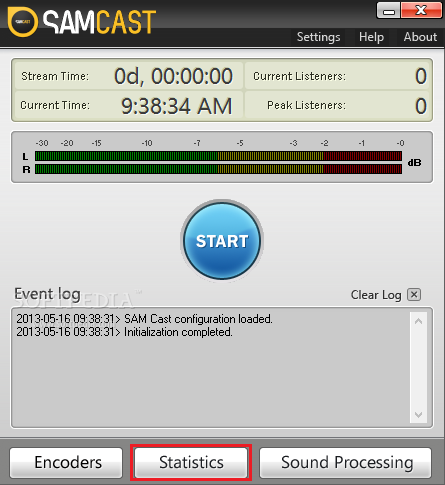
To enable your SHOUTcast Statistics Relay, click on the Statistics button in the SamCast window.
SamCast - Open Statistics window Expand
2

Add a SHOUTcast statistics relay

After the Statistics Relay window opens, click the + button to add a new relay. Select SHOUTcast statistic relay from the list and click OK.
SamCast - Add SHOUTcast relay Expand
3

Enter your Primcast server credentials

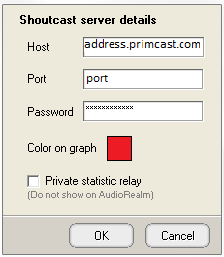
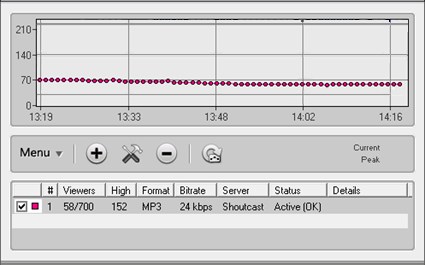
In the Host section, enter your Primcast SHOUTcast stream address, port number, and streaming password. Once saved, right-click the graph and select Force Update to connect immediately.
SamCast - Enter server credentials Expand

FAQ

Common questions about setting up SamCast for live audio streaming with Primcast.

Where do I find my stream address, port and password?

Log into your Primcast dashboard and open your radio server settings. Your stream address, port number, and source password are listed there. Copy them exactly into the SamCast host section.

What relay type should I select?

Select SHOUTcast statistic relay when adding a new relay in SamCast. This is compatible with Primcast SHOUTcast servers.

The graph is not updating - what should I do?

Right-click on the statistics graph and select Force Update to trigger an immediate refresh. If it still does not update, double-check your server address, port, and password for typos.

Do I need a paid Primcast plan to stream?

Yes, you need an active Primcast radio streaming plan which provides the server credentials used in this tutorial. Visit our Radio Streaming page to view available plans and get started.

Ready to go live?

Our audio and video streaming services include unlimited connections, unlimited bandwidth, and 24/7 expert support to keep you on air.